More Details
Hardware
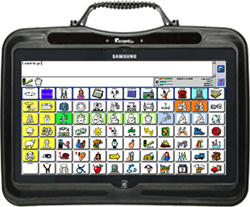
* Black Unit with coloured trims included - blue, green, red and yellow
Software
* Windows 8 operating system
* Pre-loaded with NuVoice that provides Unity language systems (including 144-location version) and Essence? vocabulary systems (60- and 84-location versions)
Vocabulary
* Icon Tutor lets user search for a word and find the appropriate icon sequence
* Specifically created Visual Scenes for concept and language learning
* Icon Prediction simplifies locating and learning the icon sequences
* Simple Tool Box provides step-by-step guidance through basic programming
* Pre-stored Activity Row categories and vocabulary, plus Pages with expanded word sets
* Vocabulary Builder helps teach a small set of words within a larger set
ombination - 0, 23, 46, 68
Onscreen/Physical keyboards
* Unity or Essence programs can be used as the onscreen keyboard
Visual display - screen
* Smooth, high-definition 29.5 cm touchscreen display, sealed to protect the components of the device
Access options
There are multiple access options to help alleviate client fatigue or as the client's motor skills change due to degenerative conditions
* Direct selection
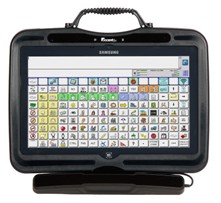
* 45, 60 and 84 location TouchGuides available to aid with direct selection
* Single or Dual-switch scanning
* USB connectivity allows use of Mouse, Joystick and with Mouse Emulation
* Access Products
* Add Headpointing with Tracker Pro
* Nueye eye gaze system - available as an add-on
Speech Quality
* Acapela Text to speech
* RealSpeak option (now includes Australian voices - Lee and Karen)
* Fonix-DECtalk Text-t-Speech software
* AT& T Natural Voices
* Ivona Voices (now includes Australian voices - Russell and Nicole)
Symbol/picture supports
* Enhanced icon import capabilities
* Access to over 4500 Minspeak icons for customising vocabulary
* Over 8500 optional PCS symbols
* Simple steps to creating Activity Rows and Pages
Programming
* Instructions for programming the keys are provided with the device
Batteries / charging
* Battery charger included
* 10 hours of battery life
* Extended Battery Option provides 20 to 22 hours of battery life with normal use. Please note that this adds extra weight (450 grams) to the device.
Manual and support materials
* Complete Operator Manual on CD
* Content manual in device
Other specialised features
* Dual cameras
Advanced Features
* Smooth, high-definition 26cm (10") touchscreen display, sealed to protect the components of the device
* Notebook tools let the user write, copy and paste in their notebook
* Front and rear cameras for taking pictures and video-chatting
* Enhanced icon import capabilities
* Access to over 4500 Minspeak icons for customising vocabulary
* Over 8500 optional PCS symbols
* Simple steps to creating Activity Rows and Pages
* NuVoice? Emulation software with numerous special features, including tips for customising device
* Integrated Bluetooth channel for connectivity to either an external computer, a switch or for phone and speaker access (Bluetooth Adapter for PC and MAC required for computer access; Bluetooth wireless switch required for switch access)
* Context-Sensitive Help built into the device for fast answers that are easy to access
Computing Benefits
* Full features of a Windows 8 based device, including menu-driven programs
* User can send and receive emails and access the Internet (accessories required)
* Unity or Essence programs can be used as the onscreen keyboard
* Built in Wi-Fi capability
* Bluetooth and IR capabilities
Therapist Tools
* LAMP sets
* AAC Language Lab Lesson Plans, support material is easily accessible with the selection of a few buttons
* Language Activity Monitor (LAM) software for tracking progress by collecting language samples
Interfacing capabilities
* USB ports
Mounting/Portability
* Built-in Handle Stand Combination - 0, 23, 46, 68
Option Details
Carry Case Large for Accent
* Large sized carry case with silk-screened PRC Logo for Accent 1200, 1000 or 800.
Backpack style carrying case with adjustable shoulder straps
* Allows you to carry your Accent and accessories all in one convenient location.
Accent Deluxe Carry Strap
* The standard (short) strap is adjustable from 711mm to 914mm (28" to 36")
Accent 1200 Touchguide - 45, 60, 84 or 144 locations
* The Accent 1200 TouchGuide allows the Accent 1200 to be set up for 45, 60, 84 or 144 locations to accommodate a wide range of cognitive and motor skills. Precisely engineered holes help guide the user's touch to targeted icons on the screen and reduce accidental activations. The TouchGuide can be removed for cleaning or replaced when necessary.
Accent 1200 Screen Protector Kit
For Accent 1000. Includes 6 Protectors per pack (3 standard and 3 anti-glare) with applicator squeegee. Protects the display screen from dust, scratches, moisture and food spills. Reduces glare and reflection from screen. Clear vinyl sheet. Thickness .008". Adheres to the screen by static. Works well with TouchGuides.
Look To Learn Eyegaze Software
The Grid 2 Communication System
Tacker Pro
*TrackerPro is a computer input device that takes the place of a mouse for people with little or no hand movement
TrackerPro Mounting Bracket for Accent 1200
* To securely hold the TrackerPro head tracking camera
Accent Car Charger
Picture Word Power / Word Power software
Bluetooth Adaptor (Dongle)
Warranty
* LibCover 1 year warranty
Considerations
Output
* Be aware of the speaker position on the device and take steps not to block the sound
* Speech should be setup to meet the need. When using recorded speech, this can include another person recording messages in a voice of the same gender, appropriate age and appropriate language. For synthesised speech, ensure any speech settings meet the device user's need
Input
* Regularly clean the screen using appropriate methods, consult the device manual or the supplier for details
* Always remove any attached accessories before removing the device from a wheelchair mounted support system
Access
* Ensure the input settings best suited are applied so that access to the device is not a barrier
* Write down the settings of the device and keep them in a safe place. They may be needed in the future if they are accidentally changed or the device is reset to factory defaults
* Switch and scanning users are unable to access the integrated computer functions.
Portability
* Consider suitability for people who are independently mobile and the accessories available to assist, particularly for this device as it's designed to be portable
* If using mobility aids, consider the wheelchair mounting options at the same time as the device. Effective access to the device is extremely important
Programming
* As with all programmable speech generating devices, as the communication needs of the person using the speech generating device changes, the messages then also require changing. This may or may not be an ongoing process
* Consider whether the included language system for synthesised speech devices is the most appropriate for the communication need
Special Features
* Devices with LCD screens can be harder to see outdoors and be aware of reflected glare
* The combination of direct and indirect accessing modes makes this device useful for users who have changing accessing requirements or as a multi user device for a department.
* Internal memory and the use of external memory drives (USB drives) can assist users who are required to produce large files and give presentations.
Batteries and Charging
* Internal and external batteries requiring regular charging and also need proper care. They should always be charged with the AC adapter that came with the device
* The batteries will require replacement after some years of use. This will be an additional cost.
Mounting and Installation
* Wheelchair mounting options are available for this device if required. A proper assessment of the access need should be a part of the entire prescription process
Accessories
* Consider if the carry case allows the device to be used without removing the device.
* Consider splash guards or waterproof covers to protect the device from moisture, if they are available.
* Are there any future consumables that will be required over the lifetime of the device, e.g. battery replacement after 2 years.
Manuals and Support
* Detailed information to support programming and use of this device is available
* This device should be trialled to ensure suitability for an individual
Training Needs
* People supporting this device and it's users may require training for effective programming and use of the communication software.
* Consider your training needs when selecting the device you want
* Ordering of a dedicated device may be a requirement within some funding guidelines
Insurance
* As this a high-expense device, consider taking insurance cover for this device against damaged and theft
Prescription Guidelines
Assessment and advice from an interdisciplinary team, with an experienced speech pathologist and occupational therapist, in regard to mounting, programming and set up of this device is recommended.
Refer to the EnableNSW Prescription Guidelines for Speech Generating Devices for further information. This can be accessed at the EnableNSW website.
Place Of Manufacture
Prentke Romich Company (PRC) - United States of America


 subscribers